Shape the width
Turn clockwise to narrow low-frequency stereo content and widen the highs. Turn counterclockwise to reverse the contour. Return to the centre for a neutral main control.
Available for Mac VST3/AAX and Windows x64 VST3
Pull the lows inward and open the highs outward, or reverse the balance, with one continuous control.
The complete plugin is free: no payment, signup or licence key. Choose a stereo track or bus and start shaping its stereo field.
macOS · VST3 · version 1.0.0
Signed and notarized VST3 plugin in a ZIP for manual installation. Apple Silicon and Intel binaries are included. This download contains no AU, AAX or standalone application. Logic Pro requires AU and cannot load this VST3 download.
Download Mac VST3 ZIP (211.2 MB)~/Library/Audio/Plug-Ins/VST3. Create the VST3 folder if needed.Fold.vst3 bundle into that folder. Keep the bundle intact; this per-user installation does not require administrator privileges. Presets, artwork and fonts are included, with no separate asset pack needed.Build targets: macOS 11.0+ on Apple Silicon and macOS 10.15+ on Intel. Apple Silicon REAPER editor, offline audio and session recall checks passed. Intel/Rosetta automated checks passed; physical Intel hardware, Intel DAW interaction and older macOS versions have not been verified.
The included README predates the Apple Silicon REAPER check. This ZIP is not an installer. To remove or roll back, close your DAW, remove only the installed Fold.vst3 bundle and restore your backup. Saved presets and settings remain in place. Contact support@kaizendsp.com if loading fails.
49af8a21d96cbe42c09c8dfb22ac7bf0ed900a6e1024b2321f386ad0d74769c6In Terminal: shasum -a 256 "path-to-downloaded.zip". Compare the result before installing.
macOS · AAX for Pro Tools · version 1.0.0
This ZIP contains a signed, notarized and stapled macOS installer for Fold AAX. Apple Silicon and Intel binaries are included. AU, VST3 and standalone are not included in this installer; use the separate VST3 download for a VST3 host.
Download Mac AAX installer ZIP (211.3 MB)Fold-1.0.0-AAX-266cd2d.pkg and follow the macOS installer. It may request administrator approval; this is not a bundle for manual copying.Fold.aaxplugin in /Library/Application Support/Avid/Audio/Plug-Ins. Other plugin formats are untouched. Artwork, fonts and presets are included; no separate asset pack is needed.Use a 64-bit AAX-capable Pro Tools version that supports your Mac and macOS version. Encoded build minimums are macOS 11.0+ on Apple Silicon and 10.15+ on Intel; Pro Tools may require a newer macOS version.
The installed candidate passed bounded Pro Tools 25.12.1.133 editor, bypass, automation and fresh-process session recall checks with synthetic offline audio. Physical Intel, older macOS and realtime hardware-audio operation have not been verified.
The included README predates this later Pro Tools check. To remove or roll back, quit Pro Tools, remove only Fold.aaxplugin from the system plugin folder and restore your backup; administrator approval may be needed. Keep saved presets and settings. Contact support@kaizendsp.com if loading fails.
3ca1a3c1f1e435430a0b97523b7bedd5c7e6a392d4a129ffee23419dc4e3f306In Terminal: shasum -a 256 "path-to-downloaded.zip". Compare the result before installing.
Windows x64 · VST3 · version 1.0.0
Signed ZIP for manual installation in a Windows x64 VST3 host. No installer, standalone application or Windows AAX is included.
Download Windows VST3 ZIP (105.6 MB)Fold.vst3 folder to C:\Program Files\Common Files\VST3. Do not copy only the inner binary. Windows may request administrator approval for this folder.Signature/trust and automated plugin-host checks passed for these exact files. DAW and Windows-version compatibility can vary; this is not a claim that every host has been tested. If loading fails, close the DAW, restore your saved plugin copy and contact support@kaizendsp.com.
5c7a0e6711b866feefaef5abc3596ec9b063fcd09e21d2744b51c2c1896ebb85In PowerShell: Get-FileHash -Algorithm SHA256 "path-to-downloaded.zip". Compare the result before installing.
What Fold does
Fold shapes stereo width across frequency. Add resonant body and selectable flavours, sculpt the low end, and customize its appearance.
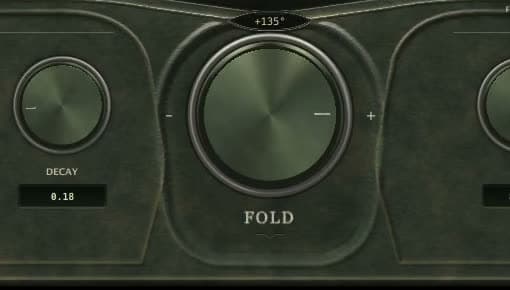
Turn clockwise to narrow low-frequency stereo content and widen the highs. Turn counterclockwise to reverse the contour. Return to the centre for a neutral main control.
Tune a resonant Body stage, choose a Flavour, and use Low Cut and Output Trim to shape the result.
Choose a finish, replace the chassis and knob artwork, and import or export an appearance pack. Your look stays separate from your audio settings.
Hear the contour
Put on headphones. Switch between the same original stereo synth phrase with Fold centred, clockwise and counterclockwise. Listen to where the low chords and upper notes sit.
Fold centred
Hear the main Fold control on its own, with the other effects switched off. Examples are loudness-matched for a fair comparison.
Interface
Getting to know Fold
Start with a stereo track, bus or effects return. The main control reshapes the differences already present between left and right, so the result depends on your source. It does not create stereo width from identical left and right channels.
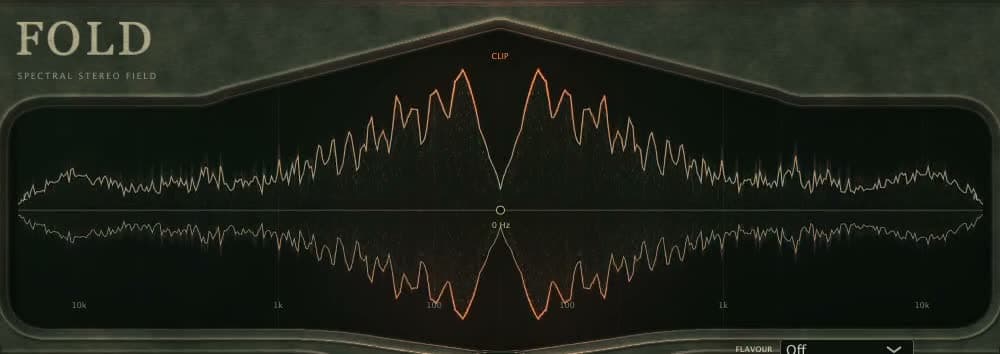
The final left and right output spectra, arranged around the centre. The central Hz control adjusts Low Cut. The degrees above the main knob show Fold position; they are not a measurement of audio phase rotation.
Yes. Choose the Mac VST3 or Windows x64 VST3 ZIP for manual installation, or the Mac AAX installer ZIP for Pro Tools. Fold is completely free, with no signup, payment or licence key. AU and Linux downloads are not available. Logic Pro requires AU and cannot load these downloads.
Also from Kaizen DSP
Build on that creative freedom with Choroboros: a modulation and chorus plugin with an Engine Builder and visual customization. Design your sound and your look.